SPL Token vs Token-2022: Which Should Your Solana Token Use?
SPL Token or Token-2022? What each Solana token standard does, the extensions Token-2022 adds, compatibility trade-offs and how to choose.
By Blue Brick team · Published 25 September 2026 · 3 min read
Every token on Solana is created by a token program. There are two: the original SPL Token program and the newer Token-2022 program, also called Token Extensions. Picking the right one is one of the first decisions in any launch, and one of the hardest to undo.
What SPL Token does
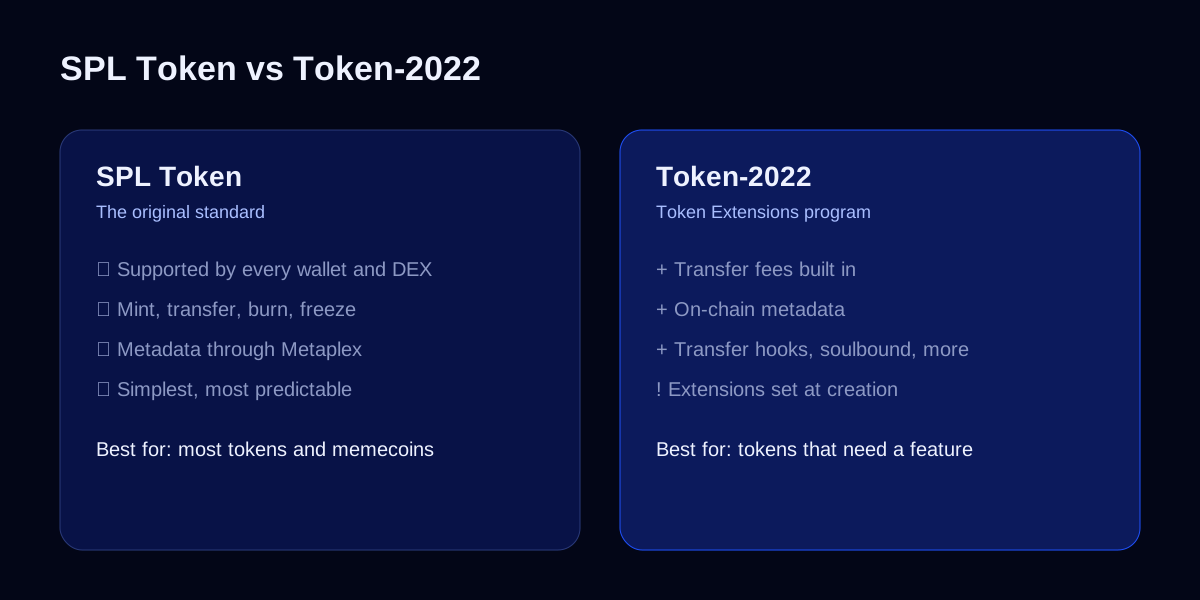
The original Token Program handles the basics: creating a token, minting supply, transferring, burning, and freezing accounts. Almost every token on Solana uses it, including most memecoins. Its biggest strength is that everything supports it: every wallet, every DEX, every explorer and every portfolio tracker.
Name, symbol and logo aren't stored by the token program itself; they live in a separate metadata account using the Metaplex Token Metadata standard.
What Token-2022 adds
Token-2022 is a superset of the original program. It works the same way for the basics, and adds optional extensions you can switch on when the token is created. The most useful ones:
| Extension | What it does |
|---|---|
| Transfer fee | Takes a percentage of every transfer, automatically, on-chain |
| Metadata and metadata pointer | Stores name, symbol and image on the token itself |
| Transfer hook | Runs your own program's logic on every transfer |
| Non-transferable | Makes tokens soulbound: they can't be moved once received |
| Permanent delegate | Lets one address move or burn anyone's tokens (for compliance use) |
| Default account state | New holders start frozen until approved |
| Confidential transfers | Hides transfer amounts using zero-knowledge proofs |
| Interest-bearing | Shows balances growing by a set rate |
These are enforced by the token program itself, so a transfer fee isn't something a website can skip: every wallet and DEX that handles the token applies it.
The catch: plan it up front
Two things make Token-2022 a decision to take carefully:
- Most extensions can't be added after the token is created. If you might need a transfer fee later, it has to be set up at launch.
- Not every tool supports every extension. Support has grown a lot, but some wallets, DEXs and portfolio tools still handle certain extensions poorly or show warnings. Phantom, for example, warns users about tokens with a permanent delegate.
Some extensions also affect trust. A permanent delegate or a default-frozen state gives the creator real power over holders' tokens, and experienced buyers check for them.
Which should you use?
Use SPL Token if:
- You're launching a memecoin or community token.
- You want the widest possible support in wallets, DEXs and tools.
- You don't need any specific extension.
Use Token-2022 if:
- You need a feature only extensions provide, such as a built-in transfer fee, soulbound credentials or transfer rules.
- You've checked that the wallets, DEXs and tools your users rely on support the extensions you're using.
- You've tested everything on devnet first.
Choosing Token-2022 "because it's newer" is a common mistake. If you don't need an extension, SPL is the safer choice.
Setting authorities right
Whichever program you choose, the authorities on your token matter as much as the standard. Mint, freeze and metadata authorities decide who can change supply, freeze wallets or change your branding. We cover them in mint and freeze authority explained.
Getting it right the first time
Because so much is fixed when the token is created, it pays to have the setup checked before launch. Our token launch service covers choosing the standard, configuring extensions and authorities, and testing everything on devnet before mainnet.
Keep reading
Token launches
How to Launch a Token on pump.fun in 2026: A Step-by-Step Guide
A practical guide to launching a token on pump.fun: how the bonding curve and graduation to PumpSwap work, what to prepare, launch day, and what happens next.
25 Sept 2026 · 4 min read
Token launches
Mint and Freeze Authority on Solana: When to Revoke Them
Mint, freeze and update authority explained. What each Solana token authority can do, why buyers check them, and when revoking them builds trust.
25 Sept 2026 · 3 min read
Token launches
Tokenomics and Vesting for Solana Tokens: A Practical Guide
How to plan tokenomics that survive launch: supply, allocations, liquidity, cliffs and linear vesting, and why on-chain vesting builds trust.
24 Sept 2026 · 3 min read